Do you work on my vehicle?
Show the makes or vehicle types you work on and the jobs you take on, from logbook servicing and tyre fitting to panel repairs and upholstery.
For Australian workshops and automotive specialists
Help drivers find the right service, see the work you do and contact your team. Build a website around the way your business handles service bookings, repair enquiries and estimates.
What drivers need before they call
A driver searching on their phone may be due for a service, looking for tyres or dealing with accident damage. If they can’t tell whether you handle their vehicle or how to get a quote, they may call another workshop.
Put the answers on the service page, close to the call or enquiry button. Your team can then start the conversation with the vehicle details and the job the driver needs help with.
Show the makes or vehicle types you work on and the jobs you take on, from logbook servicing and tyre fitting to panel repairs and upholstery.
Show the address, opening hours and phone number for each location. If services differ by workshop, explain which team handles each job.
Give routine jobs a booking request. For repair or upholstery work, explain what details to send and when your team needs to see the vehicle before pricing the job.
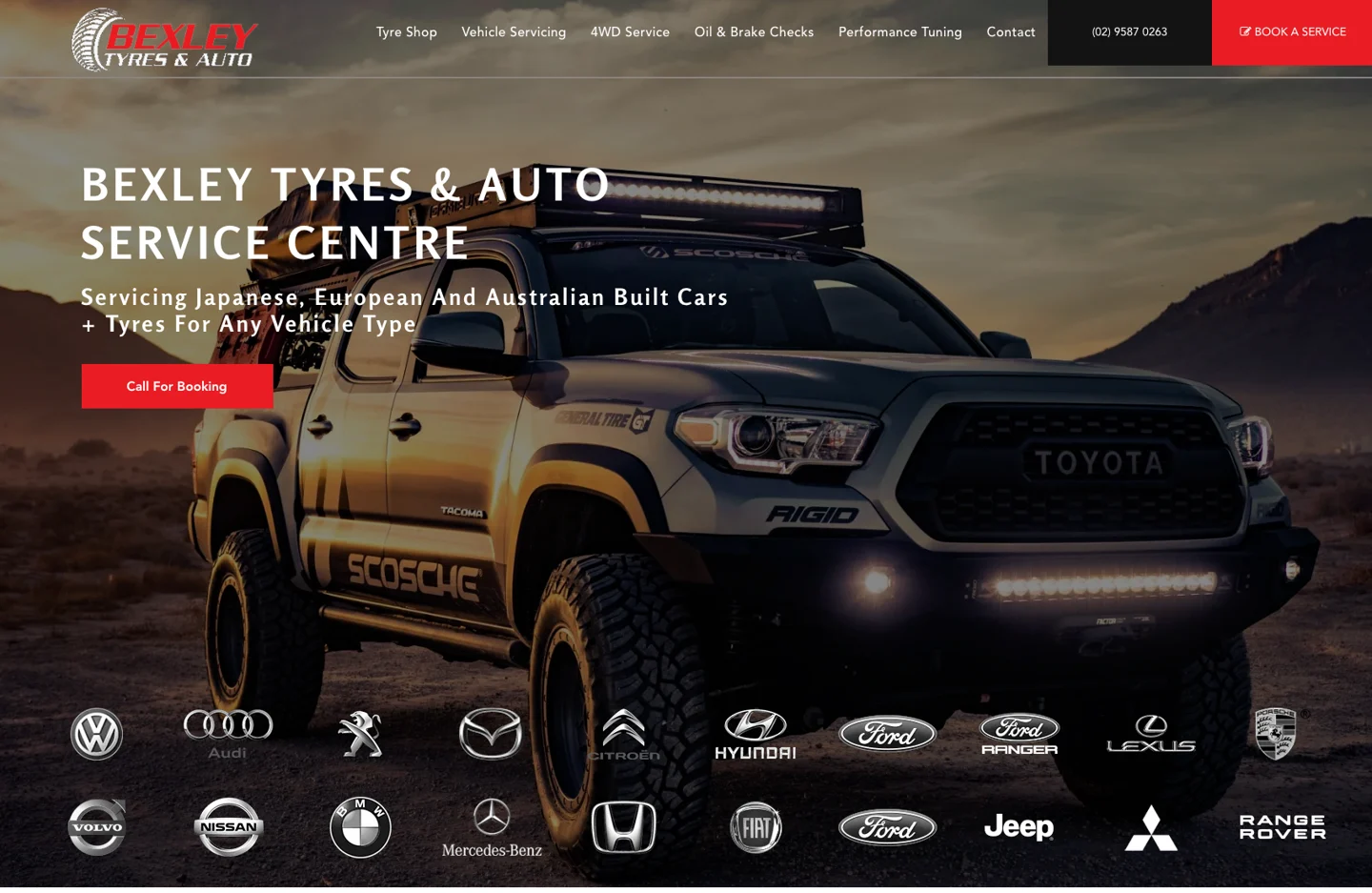
A 4WD fills the homepage, with tyre sales, servicing and 4WD work easy to find in the menu. The call and booking buttons give drivers a direct route to the workshop.
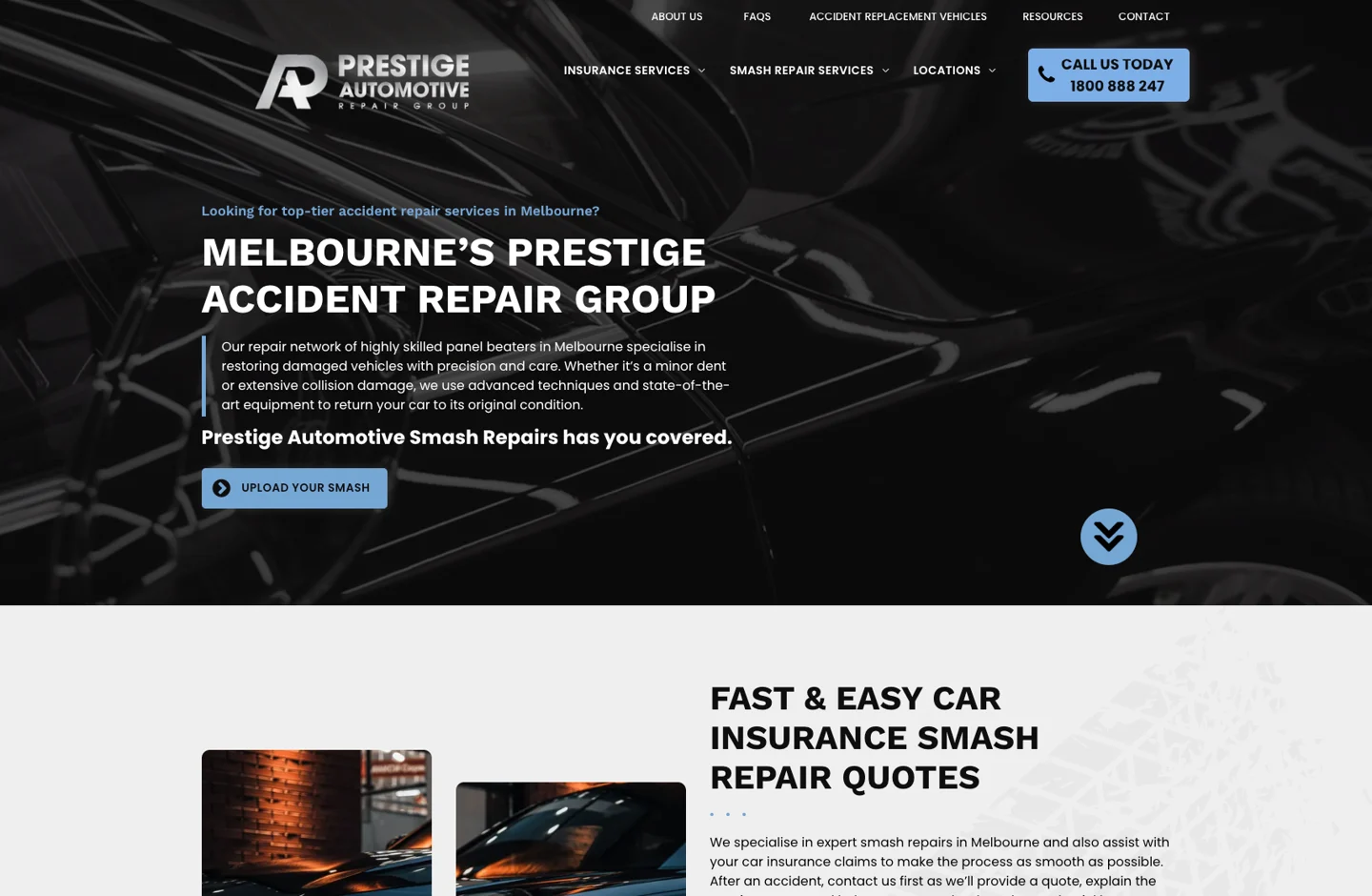
The Melbourne repair group separates smash repairs, insurance services and locations. Its photo upload button gives drivers a clear route to share damage details.
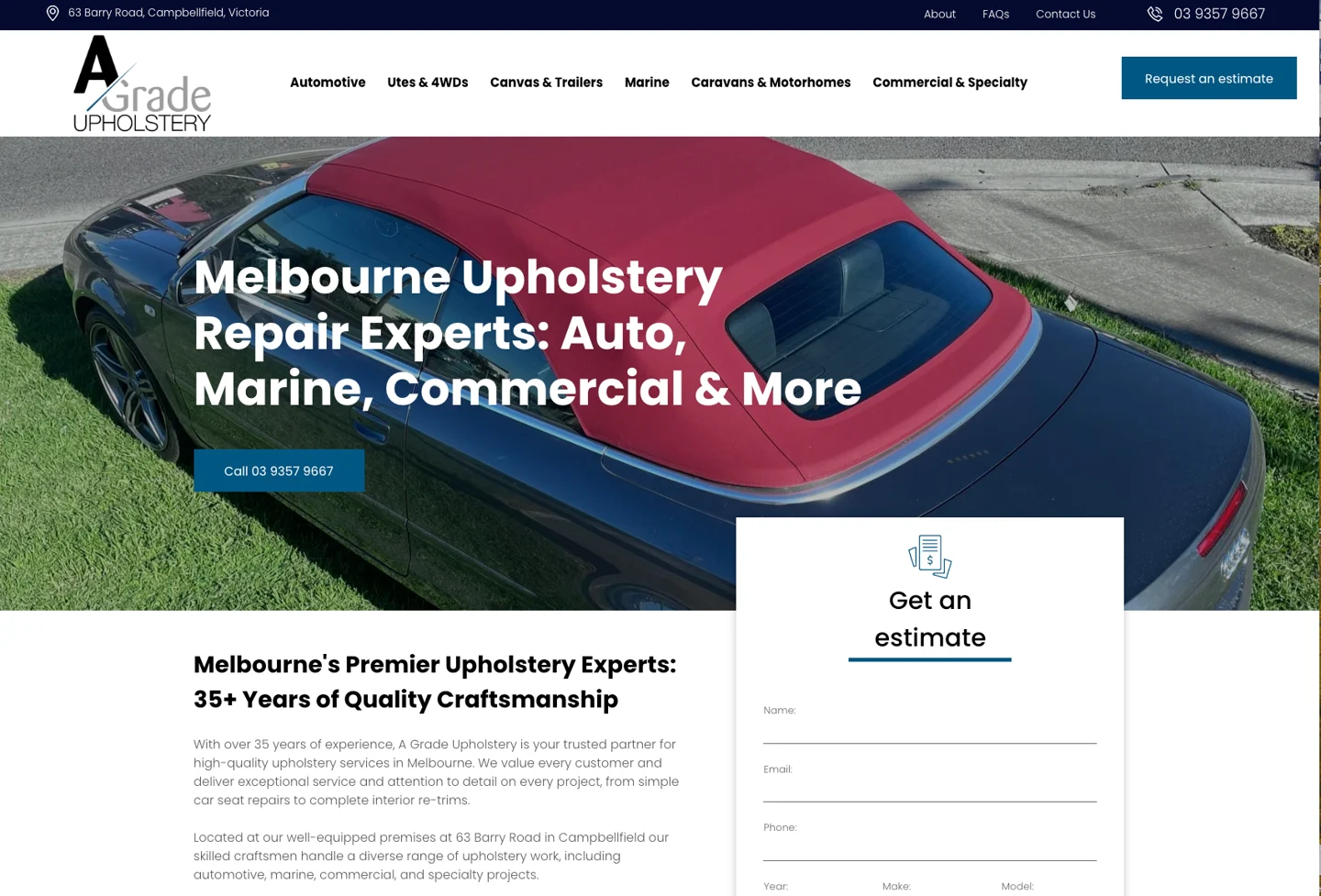
A convertible project shows the work upfront. The estimate form asks for the vehicle year, make and model, giving the team context for a seat repair or interior re-trim.
Explain logbook servicing, diagnostics, brakes and other services your workshop provides. Show the makes or vehicle types you accept and what customers need to bring.
Give tyre fitting, alignments and 4WD servicing clear paths. Invite customers to share their tyre size, vehicle and driving needs so the team can advise on options.
Separate collision repair, assessment and insurance enquiries. For repair groups, give each workshop its own address, opening hours and contact route.
Use genuine before-and-after photos to explain seat repairs, re-trims and roof work. Group examples by job type so visitors can find work similar to theirs.
Explain what each service covers and how condition, vehicle size or materials affect the quote. Use clear package details where your business has fixed inclusions.
If you take fleet or trade enquiries, explain the vehicle types you support and how businesses should contact you about recurring work.
Ask for the vehicle year, make and model, the service required and the preferred day. Set a clear expectation that your team will confirm the appointment.
Tyre enquiries can include size and intended use. For accident damage and upholstery, collect a short job description and discuss whether photos would help.
Bring your current booking link or software details to the brief. Agree whether the website should link to it, embed it or pass enquiries to your existing workflow.
Make your workshop easy to find from a phone. Show accurate opening hours, directions and the services offered at each location. Give people a useful page for the job they are searching for, whether that is wheel alignment or car seat upholstery.
Keep your workshop details consistent with your Google Business Profile. Connect service pages to the right locations, use genuine workshop photos and make calls and bookings easy to reach. Explore Local SEO or Google Business Profile support.
mechanic in [suburb]
tyre fitting near me
smash repairs in [area]
car upholstery repairs in [city]
Review service pages, locations and galleries. Keep useful URLs and map redirects for pages that move.
Test calls, forms and booking links on a phone. Confirm where enquiries go and who replies to each type of job. Use this guide to spot mobile layout and navigation issues during those checks.
Confirm domain, email and hosting access. Review analytics and the booking tools your team uses before switching the site over.
A real person behind your website

Robert is the person behind Social Space. Start with your automotive business, your existing website and the jobs you want more of. Then agree the content, features and plan before the build starts.
Talk through your services, locations, current site and enquiry process. Identify what is worth keeping.
Organise automotive services, project galleries and business details. Use genuine project photos and approved copy.
Review the design on phones and desktops. Check service descriptions, contact details, forms and links.
Complete the agreed domain and redirect checks. Get CMS training if included, or request managed changes.
Choose how your website works for you
A managed website, CMS control or a website with ongoing local visibility support. Choose the level of help your automotive business needs.
$39/month
$199 initial build
$59/month
From $549 initial build
$249/month
Managed website build included
Prices include GST. Monthly fees continue after launch. Annual billing options are available. Additional pages, copywriting, revisions and custom features are scoped before work starts. Unlimited publishing is not unlimited article writing.
Compare all inclusions, annual prices and website terms →Before your automotive website build
Booking requests, photo uploads, pricing and what to plan before launch.
Social Space builds websites for mechanics, tyre shops, smash repairers, auto upholsterers and other automotive specialists. The page structure follows the services you offer and how customers contact you.
Your site can use a service request form or link to your existing booking system. A request lets your team confirm availability. Live booking and workshop software integration are scoped before the build.
Photo uploads can be scoped around file limits, storage, access and who handles each request. Ask only for the images and vehicle details your team needs. An inspection may still be needed before confirming an estimate.
A standard site can explain the tyres you stock and collect fitment enquiries. Live stock, tyre size selectors, supplier feeds and online checkout require a separate scope.
Yes. Robert can review your existing services, locations, photos and booking links. Keep useful URLs where practical and map redirects before moving pages. Check domain and email access before launch.
Core (CMS) Website includes editor access and one-to-one training. On the managed Marketing Website plan, you can request changes. Agree how you want to manage galleries and service updates before the build.
The build can include service pages, page titles and useful internal links. Ongoing Local SEO and Google Business Profile support are available separately or through Local Essentials. Search positions and enquiry volumes vary.
Marketing Website is $199 initial build plus $39 per month. Core (CMS) Website starts from $549 plus $59 per month. Local Essentials is $249 per month with a managed website build included. Prices include GST. Custom features are scoped separately.
Tell me about your business, your automotive services and what your website needs to do better. I’m Robert Tickner, Social Space’s Online Visibility SEO Consultant. I’ll review your details and help work out the right next step.
A real conversation about your business, your website and what needs to happen next.
Build a better website
Website packages & pricingRefresh or move your websiteHelp with an AI websiteGet found locally
Local SEOGoogle AdsGoogle Business ProfileTrades & outdoor
AutomotiveBuildersPlumbersPool buildersHealth & wellbeing
Denture clinicsPsychologistsPhysiotherapistsBusiness & lifestyle
AccountantsMortgage brokersHair salonsPet businessesExplore all industriesFor Australian workshops and automotive specialists
Help drivers find the right service, see the work you do and contact your team. Build a website around the way your business handles service bookings, repair enquiries and estimates.
What drivers need before they call
A driver searching on their phone may be due for a service, looking for tyres or dealing with accident damage. If they can’t tell whether you handle their vehicle or how to get a quote, they may call another workshop.
Put the answers on the service page, close to the call or enquiry button. Your team can then start the conversation with the vehicle details and the job the driver needs help with.
Show the makes or vehicle types you work on and the jobs you take on, from logbook servicing and tyre fitting to panel repairs and upholstery.
Show the address, opening hours and phone number for each location. If services differ by workshop, explain which team handles each job.
Give routine jobs a booking request. For repair or upholstery work, explain what details to send and when your team needs to see the vehicle before pricing the job.
A 4WD fills the homepage, with tyre sales, servicing and 4WD work easy to find in the menu. The call and booking buttons give drivers a direct route to the workshop.
The Melbourne repair group separates smash repairs, insurance services and locations. Its photo upload button gives drivers a clear route to share damage details.
A convertible project shows the work upfront. The estimate form asks for the vehicle year, make and model, giving the team context for a seat repair or interior re-trim.
Explain logbook servicing, diagnostics, brakes and other services your workshop provides. Show the makes or vehicle types you accept and what customers need to bring.
Give tyre fitting, alignments and 4WD servicing clear paths. Invite customers to share their tyre size, vehicle and driving needs so the team can advise on options.
Separate collision repair, assessment and insurance enquiries. For repair groups, give each workshop its own address, opening hours and contact route.
Use genuine before-and-after photos to explain seat repairs, re-trims and roof work. Group examples by job type so visitors can find work similar to theirs.
Explain what each service covers and how condition, vehicle size or materials affect the quote. Use clear package details where your business has fixed inclusions.
If you take fleet or trade enquiries, explain the vehicle types you support and how businesses should contact you about recurring work.
Ask for the vehicle year, make and model, the service required and the preferred day. Set a clear expectation that your team will confirm the appointment.
Tyre enquiries can include size and intended use. For accident damage and upholstery, collect a short job description and discuss whether photos would help.
Bring your current booking link or software details to the brief. Agree whether the website should link to it, embed it or pass enquiries to your existing workflow.
Make your workshop easy to find from a phone. Show accurate opening hours, directions and the services offered at each location. Give people a useful page for the job they are searching for, whether that is wheel alignment or car seat upholstery.
Keep your workshop details consistent with your Google Business Profile. Connect service pages to the right locations, use genuine workshop photos and make calls and bookings easy to reach. Explore Local SEO or Google Business Profile support.
mechanic in [suburb]
tyre fitting near me
smash repairs in [area]
car upholstery repairs in [city]
Review service pages, locations and galleries. Keep useful URLs and map redirects for pages that move.
Test calls, forms and booking links on a phone. Confirm where enquiries go and who replies to each type of job. Use this guide to spot mobile layout and navigation issues during those checks.
Confirm domain, email and hosting access. Review analytics and the booking tools your team uses before switching the site over.
A real person behind your website
Robert is the person behind Social Space. Start with your automotive business, your existing website and the jobs you want more of. Then agree the content, features and plan before the build starts.
Talk through your services, locations, current site and enquiry process. Identify what is worth keeping.
Organise automotive services, project galleries and business details. Use genuine project photos and approved copy.
Review the design on phones and desktops. Check service descriptions, contact details, forms and links.
Complete the agreed domain and redirect checks. Get CMS training if included, or request managed changes.
Choose how your website works for you
A managed website, CMS control or a website with ongoing local visibility support. Choose the level of help your automotive business needs.
$39/month
$199 initial build
$59/month
From $549 initial build
$249/month
Managed website build included
Prices include GST. Monthly fees continue after launch. Annual billing options are available. Additional pages, copywriting, revisions and custom features are scoped before work starts. Unlimited publishing is not unlimited article writing.
Compare all inclusions, annual prices and website terms →Before your automotive website build
Booking requests, photo uploads, pricing and what to plan before launch.
Social Space builds websites for mechanics, tyre shops, smash repairers, auto upholsterers and other automotive specialists. The page structure follows the services you offer and how customers contact you.
Your site can use a service request form or link to your existing booking system. A request lets your team confirm availability. Live booking and workshop software integration are scoped before the build.
Photo uploads can be scoped around file limits, storage, access and who handles each request. Ask only for the images and vehicle details your team needs. An inspection may still be needed before confirming an estimate.
A standard site can explain the tyres you stock and collect fitment enquiries. Live stock, tyre size selectors, supplier feeds and online checkout require a separate scope.
Yes. Robert can review your existing services, locations, photos and booking links. Keep useful URLs where practical and map redirects before moving pages. Check domain and email access before launch.
Core (CMS) Website includes editor access and one-to-one training. On the managed Marketing Website plan, you can request changes. Agree how you want to manage galleries and service updates before the build.
The build can include service pages, page titles and useful internal links. Ongoing Local SEO and Google Business Profile support are available separately or through Local Essentials. Search positions and enquiry volumes vary.
Marketing Website is $199 initial build plus $39 per month. Core (CMS) Website starts from $549 plus $59 per month. Local Essentials is $249 per month with a managed website build included. Prices include GST. Custom features are scoped separately.
Tell me about your business, your automotive services and what your website needs to do better. I’m Robert Tickner, Social Space’s Online Visibility SEO Consultant. I’ll review your details and help work out the right next step.
A real conversation about your business, your website and what needs to happen next.