Do you build what I have in mind?
Separate new homes, extensions, renovations and other services. Explain the work you take on and show relevant examples.
For Australian builders and renovation businesses
A homeowner needs more than a gallery before they trust a builder with their home. Show the projects you take on, where you build and what happens next. Give the right people a clear reason to contact you.
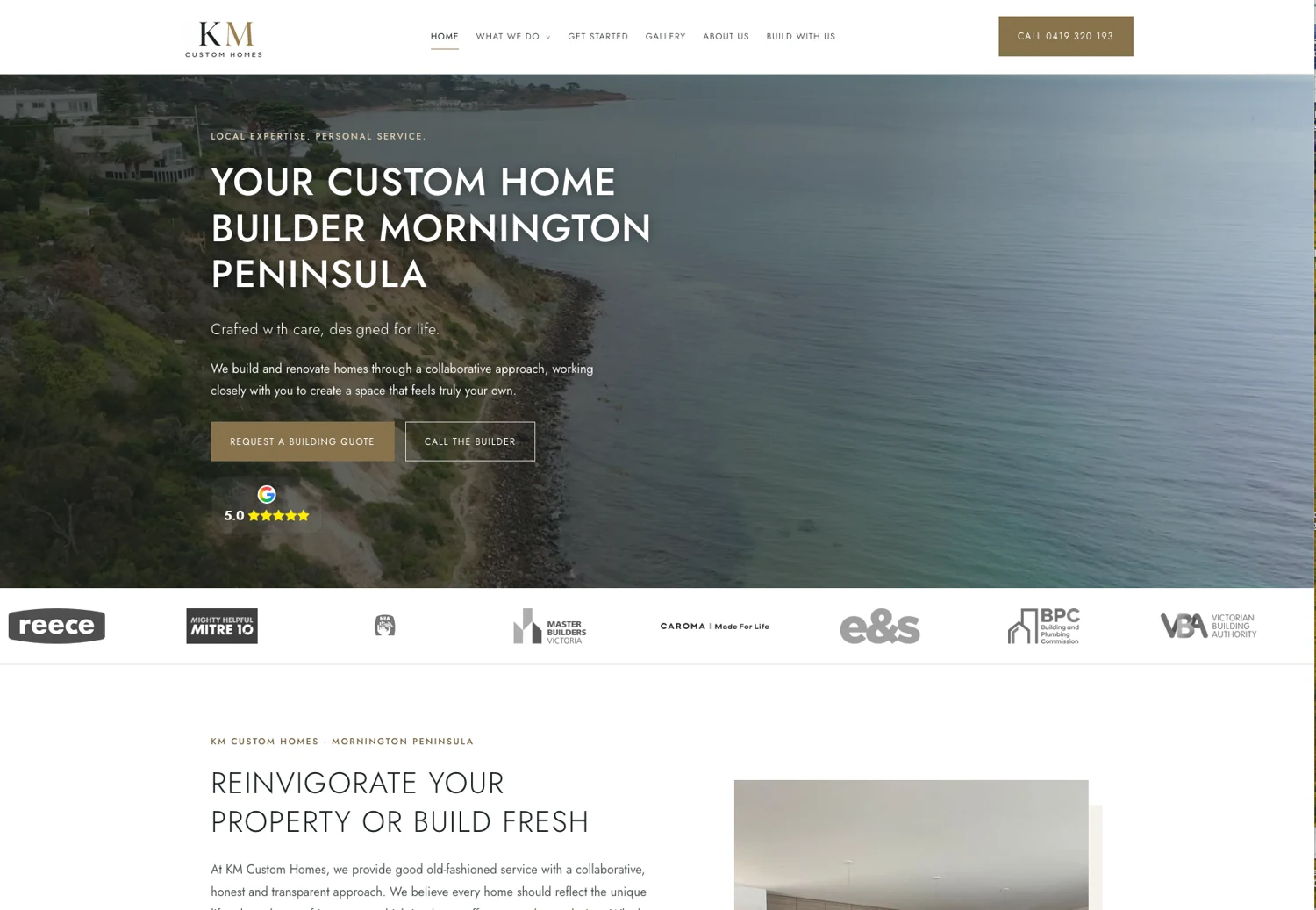
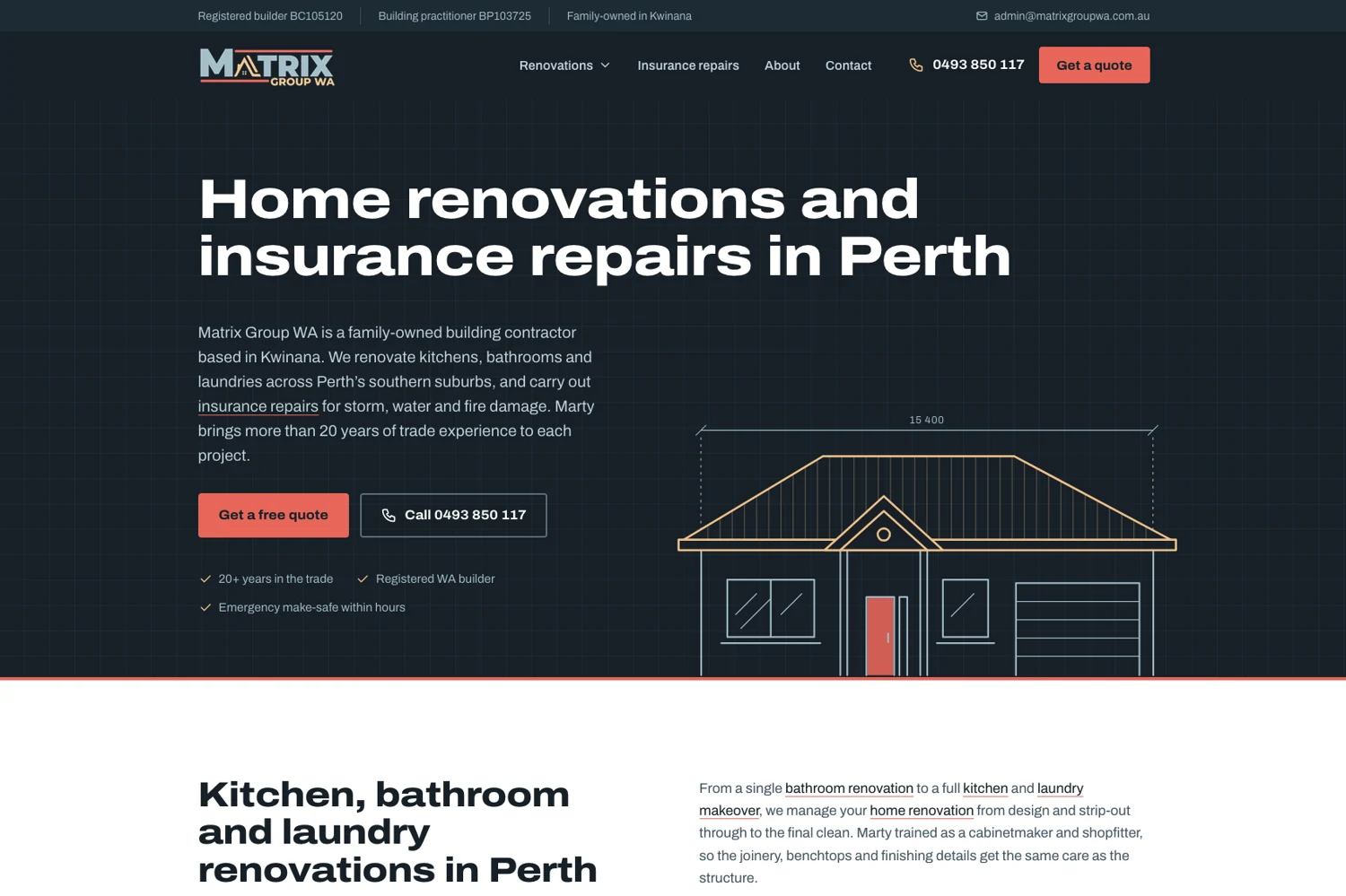
Two real clients. Two different building businesses.
KM Custom Homes and Matrix Group WA
A brief based on your services, clients and service area
Build and monthly costs shown together Compare plans
Homeowners are choosing a builder
People may compare your website with several other builders before they call. Make it easy to understand whether you are a good fit for their project.
A custom home client wants to see the style and scale of homes you build. A renovation client wants to know whether you handle their type of work, and how the process fits around an existing home. Your pages should make those differences clear.
Separate new homes, extensions, renovations and other services. Explain the work you take on and show relevant examples.
Introduce the builder and team. Make approved registration details, genuine reviews and completed projects easy to find.
State your service area, explain the first conversation and give visitors a simple way to share a project brief.
Real building businesses
These client examples show two clear approaches. The website should reflect your work and the people you want to hear from.
Mornington Peninsula, VIC
A custom home builder website with a coastal first impression, a clear building quote enquiry and access to services and the gallery.
For a custom builder, the work and the approach both matter. Give people a sense of the homes you build and how they can start a conversation.
Kwinana / Perth, WA
A building contractor website that separates home renovations from insurance repairs and makes its service area and contact options clear.
For a renovation business, homeowners need to recognise their job quickly. Clear service choices help them reach the right information.
Builder website content
The brief starts with your building services and ideal projects. Choose the pages that help a potential client understand your business, rather than filling a menu with services you do not offer.
Explain your approach to custom homes, design collaboration and the types of builds you take on. Use project examples to show style, site conditions and scale without promising a fixed construction price.
Give renovations and extensions their own space. Explain whether you handle kitchens, bathrooms, whole-home renovations, additions or structural work, using accurate information supplied by your business.
If you offer knockdown rebuilds, sloping-site builds or other specialist services, explain the scope and early questions. Visitors should know when to contact you and what information will help.
Organise completed work by project type. A useful project page can show the brief, location, scope, design decisions and finished result, supported by genuine photos.
Introduce the business owner, team and building process. Publish current registration details, relevant qualifications and approved memberships, with genuine reviews where available.
Businesses that also handle commercial fit-outs or insurance repairs need distinct service pages and contact paths. Make the audience and service scope clear so enquiries reach the right person.
More useful than an image wall
A beautiful finished home draws attention. A clear project story helps someone judge whether you are the builder for their own plans.
Give each selected project a name, suburb or region, building type and short scope. Explain what you did, with enough context to show the work clearly. Keep private addresses and client details out unless you have permission to publish them.
Professional photography, before-and-after images and progress photos can all help. Use images you own or have permission to publish. Keep the gallery easy to browse on a phone.
Illustrative project page structure
This is a content example, not a client result.
A better first conversation
Help a potential client explain the project before you pick up the phone. Keep the first form manageable and agree what your team needs to know.
Explain whether the next step is a phone call, an initial consultation or a review of the brief. Keep phone and enquiry options visible on mobile.
Plan uploads, booking calendars, CRM connections and automated follow-ups can be discussed. Their scope, access requirements and any third-party fees need to be agreed before the build.
Local SEO for builders
The words on your website should explain your work and where you do it. Project pages and clear service pages give both visitors and search engines useful context.
Agree a sensible page structure, descriptive titles, one clear main heading per page and useful links between services, projects and service areas. Publish accurate business details and optimise your project images for mobile performance.
Service-area pages should describe where you genuinely work. Avoid repeating the same page for every suburb. Google Business Profile information should match your business, with the address shown or hidden as appropriate for how you operate.
Explore ongoing Local SEO or Google Business Profile support. No search position or enquiry volume is guaranteed.
custom home builder [your region]
home renovations [your suburb]
house extensions [your area]
builder for knockdown rebuild [your region]
Your services and service area guide the page brief.Builder website redesigns and migrations
Start with the existing services, galleries, enquiry routes and content. Identify useful pages to retain, outdated information to replace and project images to move.
Keep established addresses where practical. Where URLs change, agree redirects and check links between service pages, project pages and articles.
Confirm domain, hosting and email arrangements before changing settings. Review forms, phone links, analytics and any existing booking or CRM tools in the agreed scope.
A real person behind your website

Robert is the person behind Social Space. Start with your building business, your existing website and the projects you want more of. Then agree the content, features and plan before the build starts.
Talk through your services, locations, current site and enquiry process. Identify what is worth keeping.
Organise building services, project galleries and business details. Use genuine project photos and approved copy.
Review the design on phones and desktops. Check service descriptions, contact details, forms and links.
Complete the agreed domain and redirect checks. Get CMS training if included, or request managed changes.
Choose how your website works for you
A managed website, CMS control or a website with ongoing local visibility support. Choose the level of help your building business needs.
$39/month
$199 initial build
$59/month
From $549 initial build
$249/month
Managed website build included
Prices include GST. Monthly fees continue after launch. Annual billing options are available. Additional pages, copywriting, revisions and custom features are scoped before work starts. Unlimited publishing is not unlimited article writing.
Compare all inclusions, annual prices and website terms →Plan your builder website
Make the service and next step clear before visitors have to search.
Search foundationsPlan navigation, content and useful internal links from the start.
Scope and pricingReview build costs, ongoing fees and the features to agree in your brief.
Before your builder website build
Project galleries, pricing, editing, migrations and the work to agree before launch.
Yes. The brief can focus on custom homes, renovations, extensions, knockdown rebuilds or other building services you actually offer. Agree the services, project examples, service areas and enquiry process before the build starts.
Start with a review of your current pages, project gallery and links. Keep established URLs where practical and map redirects where pages move. Domain, email, analytics and third-party tools need to be checked within the agreed migration scope.
Core (CMS) Website includes CMS access and one-to-one training. Agree how project entries and galleries will work before the build. Marketing Website is managed, with changes by request. Large project imports and custom filtering are scoped separately.
Discuss plan uploads, CRM connections and other tools in the brief. They can require additional development, access permissions and third-party services. These functions and their fees are not automatically included in every website plan.
Marketing Website is $199 initial build plus $39 per month. Core (CMS) Website starts from $549 initial build plus $59 per month. Local Essentials is $249 per month with the managed website build included. These prices include GST. Additional content, custom features and integrations are scoped before work starts.
A standard website build typically takes 2–5 days once the agreed content, images and access are ready. A larger project library, multiple services or custom functions can take longer. Your scope and timing are confirmed before work starts.
The website build includes the agreed search foundations, such as page structure, titles and internal links. Ongoing Local SEO and Google Business Profile optimisation are separate services, or part of Local Essentials. No ranking or enquiry volume is guaranteed.
Your services, service areas, contact details, business story and approved registration information are the starting point. Supply genuine project photos and details you have permission to publish. Bring any existing website access and examples of the kinds of enquiries you want.
Tell me about your business, your building services and what your website needs to do better. I’m Robert Tickner, Social Space’s Online Visibility SEO Consultant. I’ll review your details and help work out the right next step.
A real conversation about your business, your website and what needs to happen next.
Build a better website
Website packages & pricingRefresh or move your websiteHelp with an AI websiteGet found locally
Local SEOGoogle AdsGoogle Business ProfileTrades & outdoor
AutomotiveBuildersPlumbersPool buildersHealth & wellbeing
Denture clinicsPsychologistsPhysiotherapistsBusiness & lifestyle
AccountantsMortgage brokersHair salonsPet businessesExplore all industriesFor Australian builders and renovation businesses
A homeowner needs more than a gallery before they trust a builder with their home. Show the projects you take on, where you build and what happens next. Give the right people a clear reason to contact you.
Two real clients. Two different building businesses.
KM Custom Homes and Matrix Group WA
A brief based on your services, clients and service area
Build and monthly costs shown together Compare plans
Homeowners are choosing a builder
People may compare your website with several other builders before they call. Make it easy to understand whether you are a good fit for their project.
A custom home client wants to see the style and scale of homes you build. A renovation client wants to know whether you handle their type of work, and how the process fits around an existing home. Your pages should make those differences clear.
Separate new homes, extensions, renovations and other services. Explain the work you take on and show relevant examples.
Introduce the builder and team. Make approved registration details, genuine reviews and completed projects easy to find.
State your service area, explain the first conversation and give visitors a simple way to share a project brief.
Real building businesses
These client examples show two clear approaches. The website should reflect your work and the people you want to hear from.
Mornington Peninsula, VIC
A custom home builder website with a coastal first impression, a clear building quote enquiry and access to services and the gallery.
For a custom builder, the work and the approach both matter. Give people a sense of the homes you build and how they can start a conversation.
Kwinana / Perth, WA
A building contractor website that separates home renovations from insurance repairs and makes its service area and contact options clear.
For a renovation business, homeowners need to recognise their job quickly. Clear service choices help them reach the right information.
Builder website content
The brief starts with your building services and ideal projects. Choose the pages that help a potential client understand your business, rather than filling a menu with services you do not offer.
Explain your approach to custom homes, design collaboration and the types of builds you take on. Use project examples to show style, site conditions and scale without promising a fixed construction price.
Give renovations and extensions their own space. Explain whether you handle kitchens, bathrooms, whole-home renovations, additions or structural work, using accurate information supplied by your business.
If you offer knockdown rebuilds, sloping-site builds or other specialist services, explain the scope and early questions. Visitors should know when to contact you and what information will help.
Organise completed work by project type. A useful project page can show the brief, location, scope, design decisions and finished result, supported by genuine photos.
Introduce the business owner, team and building process. Publish current registration details, relevant qualifications and approved memberships, with genuine reviews where available.
Businesses that also handle commercial fit-outs or insurance repairs need distinct service pages and contact paths. Make the audience and service scope clear so enquiries reach the right person.
More useful than an image wall
A beautiful finished home draws attention. A clear project story helps someone judge whether you are the builder for their own plans.
Give each selected project a name, suburb or region, building type and short scope. Explain what you did, with enough context to show the work clearly. Keep private addresses and client details out unless you have permission to publish them.
Professional photography, before-and-after images and progress photos can all help. Use images you own or have permission to publish. Keep the gallery easy to browse on a phone.
Illustrative project page structure
This is a content example, not a client result.
A better first conversation
Help a potential client explain the project before you pick up the phone. Keep the first form manageable and agree what your team needs to know.
Explain whether the next step is a phone call, an initial consultation or a review of the brief. Keep phone and enquiry options visible on mobile.
Plan uploads, booking calendars, CRM connections and automated follow-ups can be discussed. Their scope, access requirements and any third-party fees need to be agreed before the build.
Local SEO for builders
The words on your website should explain your work and where you do it. Project pages and clear service pages give both visitors and search engines useful context.
Agree a sensible page structure, descriptive titles, one clear main heading per page and useful links between services, projects and service areas. Publish accurate business details and optimise your project images for mobile performance.
Service-area pages should describe where you genuinely work. Avoid repeating the same page for every suburb. Google Business Profile information should match your business, with the address shown or hidden as appropriate for how you operate.
Explore ongoing Local SEO or Google Business Profile support. No search position or enquiry volume is guaranteed.
custom home builder [your region]
home renovations [your suburb]
house extensions [your area]
builder for knockdown rebuild [your region]
Your services and service area guide the page brief.Builder website redesigns and migrations
Start with the existing services, galleries, enquiry routes and content. Identify useful pages to retain, outdated information to replace and project images to move.
Keep established addresses where practical. Where URLs change, agree redirects and check links between service pages, project pages and articles.
Confirm domain, hosting and email arrangements before changing settings. Review forms, phone links, analytics and any existing booking or CRM tools in the agreed scope.
A real person behind your website
Robert is the person behind Social Space. Start with your building business, your existing website and the projects you want more of. Then agree the content, features and plan before the build starts.
Talk through your services, locations, current site and enquiry process. Identify what is worth keeping.
Organise building services, project galleries and business details. Use genuine project photos and approved copy.
Review the design on phones and desktops. Check service descriptions, contact details, forms and links.
Complete the agreed domain and redirect checks. Get CMS training if included, or request managed changes.
Choose how your website works for you
A managed website, CMS control or a website with ongoing local visibility support. Choose the level of help your building business needs.
$39/month
$199 initial build
$59/month
From $549 initial build
$249/month
Managed website build included
Prices include GST. Monthly fees continue after launch. Annual billing options are available. Additional pages, copywriting, revisions and custom features are scoped before work starts. Unlimited publishing is not unlimited article writing.
Compare all inclusions, annual prices and website terms →Plan your builder website
Make the service and next step clear before visitors have to search.
Search foundationsPlan navigation, content and useful internal links from the start.
Scope and pricingReview build costs, ongoing fees and the features to agree in your brief.
Before your builder website build
Project galleries, pricing, editing, migrations and the work to agree before launch.
Yes. The brief can focus on custom homes, renovations, extensions, knockdown rebuilds or other building services you actually offer. Agree the services, project examples, service areas and enquiry process before the build starts.
Start with a review of your current pages, project gallery and links. Keep established URLs where practical and map redirects where pages move. Domain, email, analytics and third-party tools need to be checked within the agreed migration scope.
Core (CMS) Website includes CMS access and one-to-one training. Agree how project entries and galleries will work before the build. Marketing Website is managed, with changes by request. Large project imports and custom filtering are scoped separately.
Discuss plan uploads, CRM connections and other tools in the brief. They can require additional development, access permissions and third-party services. These functions and their fees are not automatically included in every website plan.
Marketing Website is $199 initial build plus $39 per month. Core (CMS) Website starts from $549 initial build plus $59 per month. Local Essentials is $249 per month with the managed website build included. These prices include GST. Additional content, custom features and integrations are scoped before work starts.
A standard website build typically takes 2–5 days once the agreed content, images and access are ready. A larger project library, multiple services or custom functions can take longer. Your scope and timing are confirmed before work starts.
The website build includes the agreed search foundations, such as page structure, titles and internal links. Ongoing Local SEO and Google Business Profile optimisation are separate services, or part of Local Essentials. No ranking or enquiry volume is guaranteed.
Your services, service areas, contact details, business story and approved registration information are the starting point. Supply genuine project photos and details you have permission to publish. Bring any existing website access and examples of the kinds of enquiries you want.
Tell me about your business, your building services and what your website needs to do better. I’m Robert Tickner, Social Space’s Online Visibility SEO Consultant. I’ll review your details and help work out the right next step.
A real conversation about your business, your website and what needs to happen next.