General & musculoskeletal physiotherapy
Give your main physiotherapy service a clear introduction. Explain your clinic’s approach and appointment process in patient-friendly language, with clinical wording approved by your team.
For Australian physios, clinics & movement practices
Your clinic helps people move forward. Your website should make their next step clear, too. Show your services, introduce your physios and help patients find the right appointment, without turning a simple booking into a search through the whole site.
Good care.
A clear way to book.
Help people understand the clinic before they arrive
A new patient may know what is bothering them without knowing the name of the service they need. A returning patient may just want the booking link. Your website needs to help both.
Use plain-language service descriptions, visible appointment options and useful first-visit information. Keep practitioner profiles close to the services they provide.
Plan the routes to appointments and classes ↓Questions a first-time visitor may have
Explain the services and client groups your clinic supports.
Clarify initial appointments, follow-ups and any assessment requirements for classes.
Make visit instructions, contact details and clinic-approved preparation information easy to find.
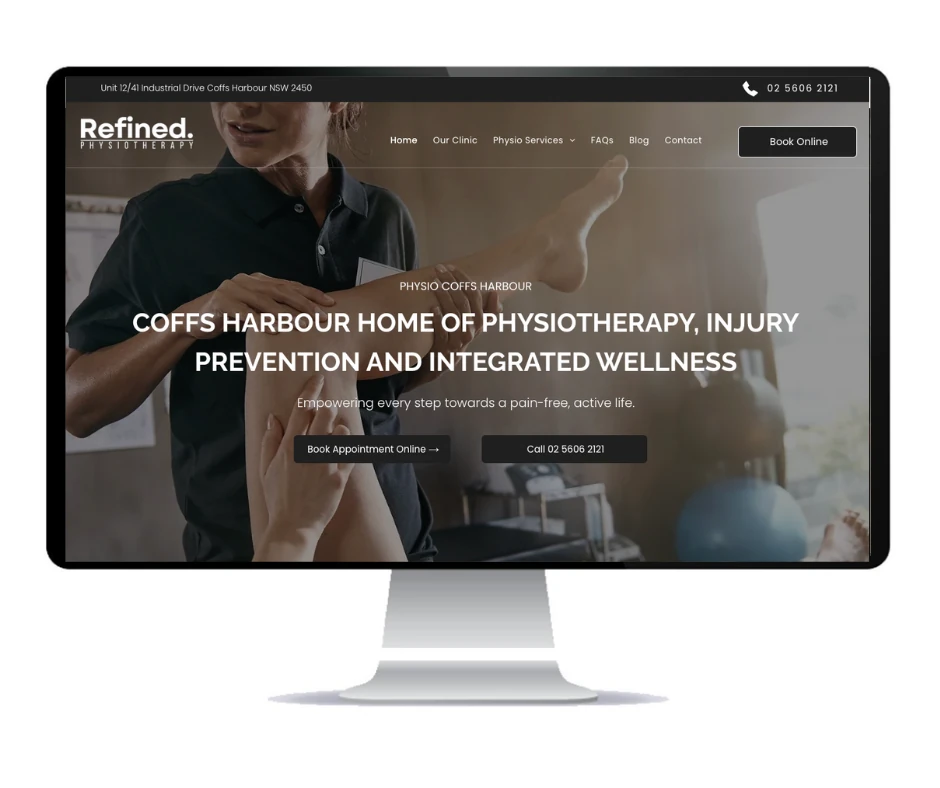
Real work / Coffs Harbour, NSW
A real website project from the Social Space portfolio. The clinic brings its physiotherapy services, practitioner introduction and online appointment link together for people exploring care.
Visit Refined Physiotherapy ↗Portfolio image shows previous website work.
Also in our client work / Nambucca Heads, NSW
Physiotherapy and clinical Pilates bring different appointment and class information into one business. Body Connect is another example of work for a practice where treatment services and exercise options need a clear place online.
Visit Body Connect ↗A useful page for each part of the practice
A list of treatment names gives visitors little context. Useful pages explain what your clinic offers, who provides the service and how to arrange an appointment. Agree the service pages, profiles and content scope before building.
Give your main physiotherapy service a clear introduction. Explain your clinic’s approach and appointment process in patient-friendly language, with clinical wording approved by your team.
Give sports and rehabilitation services their own space when offered. Show the practitioners involved and relevant facilities without promising recovery times or treatment outcomes.
Separate individual appointments from group classes. Explain the class types, timetable, assessment requirements and booking process supplied by your clinic.
If your team offers areas such as pelvic health, paediatric care or vestibular services, give them clear pages. Use accurate practitioner titles and only describe services the clinic provides.
Introduce the team with genuine photos, qualifications and areas of focus. Show the treatment spaces and practical details that help people recognise the clinic when they arrive.
Bring clinic-approved appointment guidance, fees, referral information and payment options together. Make parking, accessibility and contact details straightforward to find.
One clinic can have several ways to get started
The right route depends on how your clinic works. Make those choices visible instead of sending everyone to a single unexplained booking button. Consider which appointment options a new patient needs to see before scrolling.
Explain how a new patient should book, the relevant appointment type and where to ask a question before choosing.
Keep the follow-up booking link and reception contact details easy to reach, with clear instructions for changes.
Show the timetable and your clinic’s own assessment process. Separate a first enquiry from booking an existing class place.
Share your booking or practice-management platform during the brief. A direct link or supported embed can be reviewed for the website. Custom integrations, timetables and third-party fees are scoped separately. Your approved systems remain the place for clinical intake and patient documents.
Discuss your booking setupphysiotherapist [your suburb] ↗
sports physio [your area] ↗
clinical Pilates [your suburb] ↗
Illustrative patient searches, not ranking results.Connect the service, practitioner and place
Build a clear structure around the services your clinic offers and the locations patients can visit. Useful headings, page titles and internal links help explain those connections.
Give priority services a relevant page. Connect practitioner profiles to their actual areas of work. Use location pages for useful information about each clinic, including its team, address and visit details.
Keep your website and Google Business Profile details consistent. Practitioner-reviewed resources can answer common questions and link back to the appropriate services.
The build covers agreed search foundations. Compare local SEO packages if you want ongoing content, technical and local visibility work. No ranking position or appointment count is guaranteed.
A website that keeps up with the clinic
A new physio joins the team. A service changes. A class timetable needs updating. Plan how those changes will be handled before choosing a website package.
Core (CMS) Website gives you editing access and training. Marketing Website is managed, with changes by request. Your choice should reflect who will keep the clinic’s information current.
For an existing website, review useful services, articles and profiles before rebuilding. Keep established URLs where practical, map changed pages and agree redirects. Check domain, email and booking links before launch.
Explore website refresh and migration options →Agree the editable areas, update process and any custom features in the project scope.
A real person behind your website

Robert is the person behind Social Space. Talk through the services, team and booking process first. Then agree the content, features and plan before the build starts.
Discuss your patients, services, team and appointment types. Review what is useful on the current website.
Plan services, profiles and booking routes. Agree the copy, photography and any extra features.
Check the design, mobile layout, contact options and booking links. Your team approves professional and clinical information.
Complete agreed domain and redirect checks. Get CMS training if included, or request managed changes.
Choose how your website works for you
A managed website, CMS control or a website with ongoing local visibility support. Choose the level of help your clinic needs.
$39/month
$199 initial build
$59/month
From $549 initial build
$249/month
Managed website build included
Prices include GST. Monthly fees continue after launch. Annual billing options are available. Additional pages, copywriting, revisions and custom features are scoped before work starts. Unlimited publishing is not unlimited article writing. Custom booking, timetable and practice-system integrations are quoted separately.
Compare all inclusions, annual prices and website terms →Useful reading for your website brief
Review the inclusions and choose how your clinic’s website will be maintained.
First impressions ↗Review the role of clear copy, genuine images and a useful first screen.
Website redesign ↗Decide what to keep and what needs changing before the next build.
Before your clinic website build
Booking tools, exercise classes, website updates and what to agree before launch.
Yes. A solo clinic can centre its website on the practitioner and core services. A larger team may need more profiles, service categories and clinic locations. The structure and page count are agreed around how your physiotherapy practice operates.
Share the booking platform and link during the brief. A direct link or supported embed can be reviewed for the website. Custom integrations, patient intake, uploads and third-party subscription fees need a separate scope where required. Booking features depend on the system you use.
Yes. The structure can give initial appointments, follow-ups and classes separate routes. Your clinic supplies the timetable, class information and any assessment requirements. Custom timetable or class-management features are scoped before work starts.
Useful material includes your logo, clinic contact details, services, practitioner bios, accurate qualifications and genuine photos. Supply your current booking link and approved appointment information. Agree who will write the content and have your clinic review clinical wording before launch.
A standard website build typically takes 2–5 days once the agreed content, images and access are ready. A larger clinic site, several locations or custom integrations may need longer. Your scope and timing are confirmed before work starts.
Core (CMS) Website includes CMS access, one-to-one training and blog publishing for up to 1,500 posts. Marketing Website is managed with changes by request and unlimited blog publishing. Article writing and extra content work are scoped separately.
Yes. Review your existing services, profiles, articles and URLs before the rebuild. Keep established addresses where practical and agree redirects for pages that move. Domain, email and booking links should be checked before launch. Existing search rankings cannot be guaranteed.
The build includes agreed search foundations such as page structure, titles and internal links. Ongoing local SEO is separate, or included in Local Essentials with a managed website and Google Business Profile optimisation. No ranking position or number of bookings is guaranteed.
Tell me about your clinic, the appointments or classes you want to promote and how people book with you now. I’m Robert Tickner, Social Space’s Online Visibility SEO Consultant. I’ll review your details and help work out the right next step.
A real conversation about your business, your website and what needs to happen next.
Build a better website
Website packages & pricingRefresh or move your websiteHelp with an AI websiteGet found locally
Local SEOGoogle AdsGoogle Business ProfileTrades & outdoor
AutomotiveBuildersPlumbersPool buildersHealth & wellbeing
Denture clinicsPsychologistsPhysiotherapistsBusiness & lifestyle
AccountantsMortgage brokersHair salonsPet businessesExplore all industriesFor Australian physios, clinics & movement practices
Your clinic helps people move forward. Your website should make their next step clear, too. Show your services, introduce your physios and help patients find the right appointment, without turning a simple booking into a search through the whole site.
Good care.
A clear way to book.
Help people understand the clinic before they arrive
A new patient may know what is bothering them without knowing the name of the service they need. A returning patient may just want the booking link. Your website needs to help both.
Use plain-language service descriptions, visible appointment options and useful first-visit information. Keep practitioner profiles close to the services they provide.
Plan the routes to appointments and classes ↓Questions a first-time visitor may have
Explain the services and client groups your clinic supports.
Clarify initial appointments, follow-ups and any assessment requirements for classes.
Make visit instructions, contact details and clinic-approved preparation information easy to find.
Real work / Coffs Harbour, NSW
A real website project from the Social Space portfolio. The clinic brings its physiotherapy services, practitioner introduction and online appointment link together for people exploring care.
Visit Refined Physiotherapy ↗Portfolio image shows previous website work.
Also in our client work / Nambucca Heads, NSW
Physiotherapy and clinical Pilates bring different appointment and class information into one business. Body Connect is another example of work for a practice where treatment services and exercise options need a clear place online.
Visit Body Connect ↗A useful page for each part of the practice
A list of treatment names gives visitors little context. Useful pages explain what your clinic offers, who provides the service and how to arrange an appointment. Agree the service pages, profiles and content scope before building.
Give your main physiotherapy service a clear introduction. Explain your clinic’s approach and appointment process in patient-friendly language, with clinical wording approved by your team.
Give sports and rehabilitation services their own space when offered. Show the practitioners involved and relevant facilities without promising recovery times or treatment outcomes.
Separate individual appointments from group classes. Explain the class types, timetable, assessment requirements and booking process supplied by your clinic.
If your team offers areas such as pelvic health, paediatric care or vestibular services, give them clear pages. Use accurate practitioner titles and only describe services the clinic provides.
Introduce the team with genuine photos, qualifications and areas of focus. Show the treatment spaces and practical details that help people recognise the clinic when they arrive.
Bring clinic-approved appointment guidance, fees, referral information and payment options together. Make parking, accessibility and contact details straightforward to find.
One clinic can have several ways to get started
The right route depends on how your clinic works. Make those choices visible instead of sending everyone to a single unexplained booking button. Consider which appointment options a new patient needs to see before scrolling.
Explain how a new patient should book, the relevant appointment type and where to ask a question before choosing.
Keep the follow-up booking link and reception contact details easy to reach, with clear instructions for changes.
Show the timetable and your clinic’s own assessment process. Separate a first enquiry from booking an existing class place.
Share your booking or practice-management platform during the brief. A direct link or supported embed can be reviewed for the website. Custom integrations, timetables and third-party fees are scoped separately. Your approved systems remain the place for clinical intake and patient documents.
Discuss your booking setupphysiotherapist [your suburb] ↗
sports physio [your area] ↗
clinical Pilates [your suburb] ↗
Illustrative patient searches, not ranking results.Connect the service, practitioner and place
Build a clear structure around the services your clinic offers and the locations patients can visit. Useful headings, page titles and internal links help explain those connections.
Give priority services a relevant page. Connect practitioner profiles to their actual areas of work. Use location pages for useful information about each clinic, including its team, address and visit details.
Keep your website and Google Business Profile details consistent. Practitioner-reviewed resources can answer common questions and link back to the appropriate services.
The build covers agreed search foundations. Compare local SEO packages if you want ongoing content, technical and local visibility work. No ranking position or appointment count is guaranteed.
A website that keeps up with the clinic
A new physio joins the team. A service changes. A class timetable needs updating. Plan how those changes will be handled before choosing a website package.
Core (CMS) Website gives you editing access and training. Marketing Website is managed, with changes by request. Your choice should reflect who will keep the clinic’s information current.
For an existing website, review useful services, articles and profiles before rebuilding. Keep established URLs where practical, map changed pages and agree redirects. Check domain, email and booking links before launch.
Explore website refresh and migration options →Agree the editable areas, update process and any custom features in the project scope.
A real person behind your website
Robert is the person behind Social Space. Talk through the services, team and booking process first. Then agree the content, features and plan before the build starts.
Discuss your patients, services, team and appointment types. Review what is useful on the current website.
Plan services, profiles and booking routes. Agree the copy, photography and any extra features.
Check the design, mobile layout, contact options and booking links. Your team approves professional and clinical information.
Complete agreed domain and redirect checks. Get CMS training if included, or request managed changes.
Choose how your website works for you
A managed website, CMS control or a website with ongoing local visibility support. Choose the level of help your clinic needs.
$39/month
$199 initial build
$59/month
From $549 initial build
$249/month
Managed website build included
Prices include GST. Monthly fees continue after launch. Annual billing options are available. Additional pages, copywriting, revisions and custom features are scoped before work starts. Unlimited publishing is not unlimited article writing. Custom booking, timetable and practice-system integrations are quoted separately.
Compare all inclusions, annual prices and website terms →Useful reading for your website brief
Review the inclusions and choose how your clinic’s website will be maintained.
First impressions ↗Review the role of clear copy, genuine images and a useful first screen.
Website redesign ↗Decide what to keep and what needs changing before the next build.
Before your clinic website build
Booking tools, exercise classes, website updates and what to agree before launch.
Yes. A solo clinic can centre its website on the practitioner and core services. A larger team may need more profiles, service categories and clinic locations. The structure and page count are agreed around how your physiotherapy practice operates.
Share the booking platform and link during the brief. A direct link or supported embed can be reviewed for the website. Custom integrations, patient intake, uploads and third-party subscription fees need a separate scope where required. Booking features depend on the system you use.
Yes. The structure can give initial appointments, follow-ups and classes separate routes. Your clinic supplies the timetable, class information and any assessment requirements. Custom timetable or class-management features are scoped before work starts.
Useful material includes your logo, clinic contact details, services, practitioner bios, accurate qualifications and genuine photos. Supply your current booking link and approved appointment information. Agree who will write the content and have your clinic review clinical wording before launch.
A standard website build typically takes 2–5 days once the agreed content, images and access are ready. A larger clinic site, several locations or custom integrations may need longer. Your scope and timing are confirmed before work starts.
Core (CMS) Website includes CMS access, one-to-one training and blog publishing for up to 1,500 posts. Marketing Website is managed with changes by request and unlimited blog publishing. Article writing and extra content work are scoped separately.
Yes. Review your existing services, profiles, articles and URLs before the rebuild. Keep established addresses where practical and agree redirects for pages that move. Domain, email and booking links should be checked before launch. Existing search rankings cannot be guaranteed.
The build includes agreed search foundations such as page structure, titles and internal links. Ongoing local SEO is separate, or included in Local Essentials with a managed website and Google Business Profile optimisation. No ranking position or number of bookings is guaranteed.
Tell me about your clinic, the appointments or classes you want to promote and how people book with you now. I’m Robert Tickner, Social Space’s Online Visibility SEO Consultant. I’ll review your details and help work out the right next step.
A real conversation about your business, your website and what needs to happen next.