Explain who your practice supports.
Describe the services, age groups and appointment types your practitioners offer. Help visitors find relevant information without making treatment promises.
For Australian psychologists & private practices
Your website can make the first step feel clearer. Help people understand your services, meet your practitioners and find out how to arrange an appointment. A psychology website that reflects your practice, with useful information and a calm, straightforward design.
A human first impression.
A clearer next step.

Build understanding before the first conversation
Someone visiting your website may be comparing practitioners, checking a referral or wondering what a first appointment involves. Answer those practical questions without making them work through a wall of clinical language.
Give each page a clear purpose. Explain the practice, introduce the team and make the next step easy to find on a phone.
What belongs on a psychology practice website? ↓Describe the services, age groups and appointment types your practitioners offer. Help visitors find relevant information without making treatment promises.
Use real practitioner photos, accurate qualifications and a clear explanation of each person’s focus and approach.
Show the contact route, referral information, fees guidance and visit details supplied by your practice.
Real work from the Social Space portfolio
These projects show different psychology brands and practice styles. Your website should reflect your own team, services and approach rather than borrow another clinic’s voice.
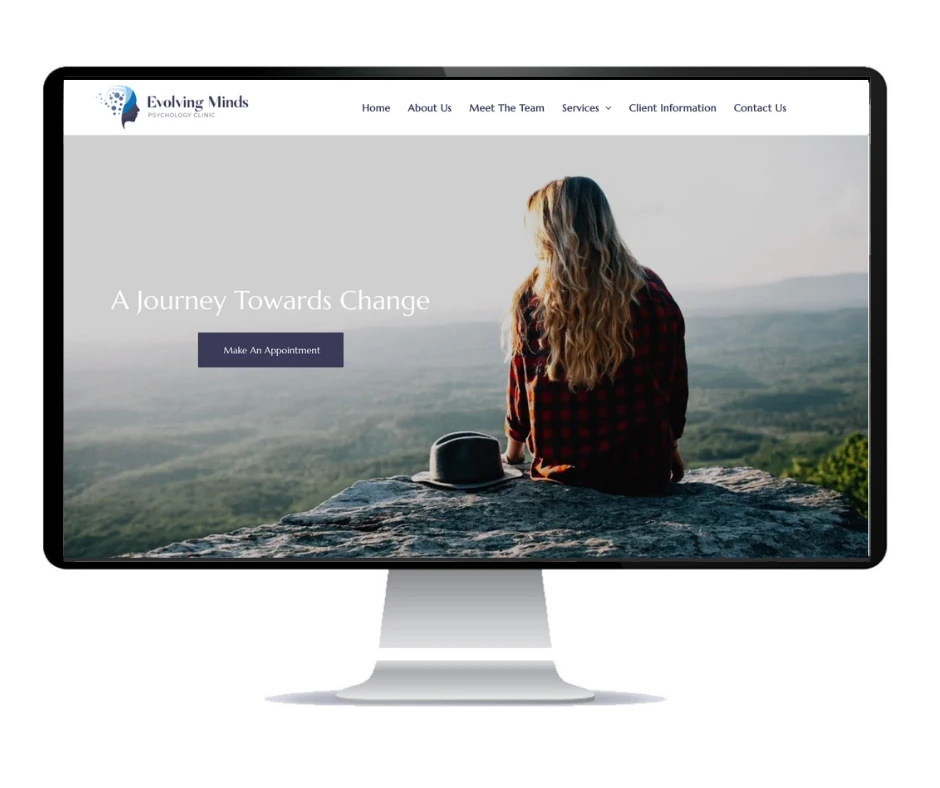
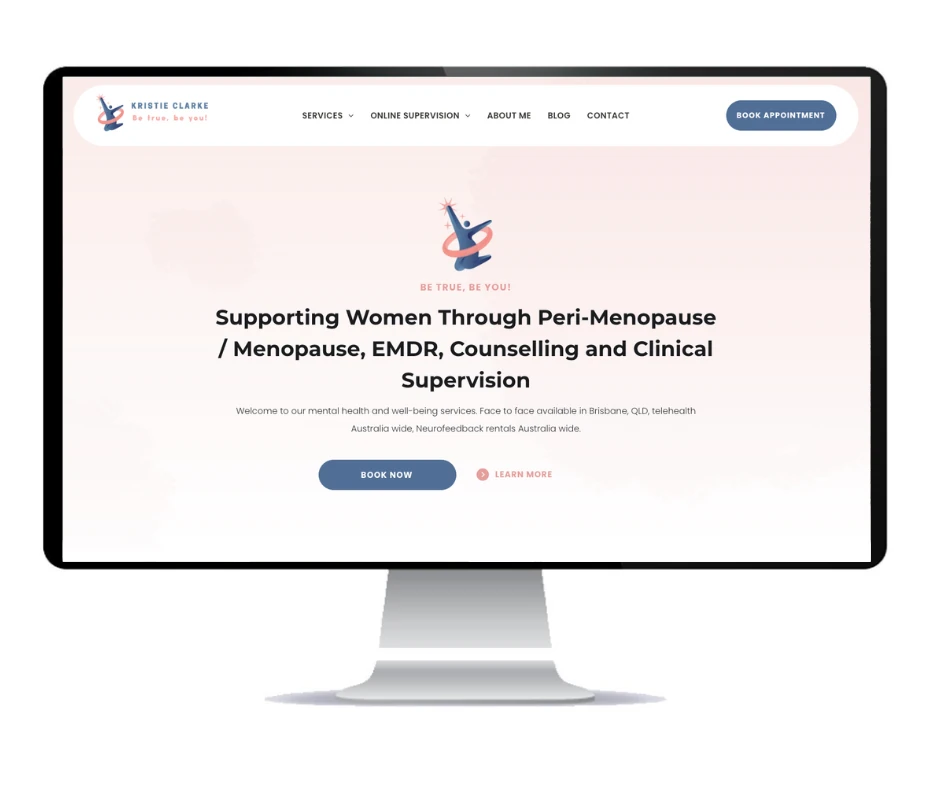
Three practices, three different identities. Your website starts with your own team, services and approach.
Explore the web design portfolio →The practice model shapes the website
Agree what people need to understand about your practice before choosing a layout. A single-practitioner website and a clinic with several psychologists need different ways to organise information.
Build a clear introduction to your services, background, location and appointment process. Keep the first website manageable, with room for agreed additions as the practice develops.
Make your profile central to the site. Explain your professional focus, who you work with and how people can enquire, without relying on a generic directory listing to tell the whole story.
Help visitors compare practitioner profiles and find the relevant service. Keep location, availability and contact information organised as the team changes.
Useful answers, organised properly
Start with the questions reception and practitioners hear most often. Agree the service pages, profiles and practical information before the build. More pages should add useful detail, not repeat the same keywords.
Bring each practitioner’s photo, approved title, qualifications and areas of focus together. Use consistent profiles so people can compare information without hunting across pages.
Give the services your practice offers useful space. Explain who each service is for and the appointment process in language people can understand. Your practitioners approve the wording.
Explain the information your practice wants visitors to have before making contact. Publish your approved fee guidance, referral process and any relevant rebate information without leaving people to guess.
Make the address, opening hours, accessibility details and parking or transport information easy to find. Multiple clinics can have distinct, useful location pages.
If your practice offers telehealth, explain how appointments are arranged and what clients should expect from the booking process. Link to your existing approved tools where relevant.
Publish useful practitioner-reviewed information and connect it to relevant services. Keep author details and content current. Blog publishing is available according to your selected website plan.
Make the next step clear for each visitor
A new client, an existing client and a referring professional may arrive with different questions. Give each a clear route to the right information.
Share your current practice-management or booking system during the brief. A direct link or supported embed can be reviewed for the website. New integrations, uploads and custom workflows are scoped separately.
Keep a general website enquiry focused on contact and appointment requests. Use your practice’s approved systems for clinical intake and document exchange.
Plan your appointment flowConnect the relevant service and practitioner information to a clear enquiry or booking option. Explain what happens after the request is sent.
Put approved referral instructions and professional contact details in one place. Link to the practice’s preferred submission method.
Keep appointment links and reception details easy to find without asking returning clients to repeat the new-client path.
psychologist [your suburb] ↗
clinical psychologist [your area] ↗
telehealth psychologist Australia ↗
Illustrative client searches, not ranking results.Clear services. Clear locations. Useful links.
Organise your website around the services you offer, the people who provide them and the places you work. Useful headings, page titles and internal links help explain those relationships.
A clinical psychologist’s profile should use an accurate professional title. A service page should reflect what the practice actually offers. Location pages should help someone plan a visit rather than repeat suburb names.
Keep practice details consistent across the website and your Google Business Profile. Link practitioner-reviewed articles to the relevant services and profiles.
The initial build covers agreed search foundations. Compare local SEO packages if you want ongoing work on content, technical issues and local visibility. Rankings and enquiry numbers are not guaranteed.
Keep what is useful. Improve what gets in the way.
An established practice may already have useful profiles, articles and service pages. Review them before deciding what to change.
A redesign can improve the layout, navigation and mobile experience while keeping valuable content. Map existing URLs, agree redirects for pages that move and check the links people already use.
Explore website refresh and migration options →The migration scope is agreed before work starts. Existing search positions cannot be promised through a redesign.
A real person behind your website

Robert is the person behind Social Space. Start with your practice, your current website and the information people need before contacting you. Then agree the content, features and plan.
Discuss your team, services, locations and appointment process. Review existing content and priorities.
Plan profiles, service pages and contact routes. Agree the writing, images and any extra integrations.
Check the design, wording, profile details and links. Your practice approves clinical and professional information.
Complete agreed domain and redirect checks. Get CMS training if included, or request managed updates.
Choose how your website works for you
A managed website, CMS control or a website with ongoing local visibility support. Choose the level of help your practice needs.
$39/month
$199 initial build
$59/month
From $549 initial build
$249/month
Managed website build included
Prices include GST. Monthly fees continue after launch. Annual billing options are available. Additional pages, copywriting, revisions and custom features are scoped before work starts. Unlimited publishing is not unlimited article writing. Custom booking, referral and practice-system integrations are quoted separately.
Compare all inclusions, annual prices and website terms →Useful reading for your website brief
See psychology projects and other Australian businesses from the website portfolio.
First impressions ↗Review how clear copy, layout and genuine business details help visitors understand a website.
Website redesign ↗Work out what is worth keeping and what needs changing before the next build.
Before your private practice website build
Practice types, booking systems, profiles and the details to agree before launch.
Yes. A solo practice can centre its website on the practitioner, services and appointment process. A group practice may need a clearer profile structure, service categories and location information. The page count and features are agreed around your team and practice model.
A directory profile can introduce your practice. Your own website gives you more space to explain services, introduce practitioners and organise referral and appointment information. The two can link together rather than making a short listing carry every detail.
Share the existing platform and booking link during the brief. A direct link or supported embed can be reviewed for the site. Custom integrations, uploads, clinical intake and third-party fees need an agreed scope. A general enquiry form is not a replacement for your approved practice systems.
A standard website build typically takes 2–5 days once the agreed content, images and access are ready. A larger group practice, many profiles or custom integrations may need longer. Timing and scope are confirmed before work starts.
Agree the writing scope before the build. Your practice supplies or approves practitioner titles, qualifications, service descriptions, referral instructions and other professional information. Website copy should describe the actual practice without promising clinical outcomes.
Core (CMS) Website includes CMS access, one-to-one training and blog publishing for up to 1,500 posts. Marketing Website is managed with changes by request and unlimited blog publishing. Article writing and extra content work are scoped separately.
Yes. Review existing profiles, service pages, articles and URLs before rebuilding. Keep established addresses where practical and agree redirects for pages that move. Domain, email and booking or referral links should be checked before launch. Existing rankings cannot be guaranteed.
Yes. Include the appointment options and locations your practice actually offers. Useful clinic pages can explain the address, team and visit information, while telehealth content explains the practice’s booking process. Extra locations, pages and integrations are agreed in the project scope.
Tell me about your practice, the services you want to explain and how people arrange appointments now. I’m Robert Tickner, Social Space’s Online Visibility SEO Consultant. I’ll review your details and help work out the right next step.
A real conversation about your business, your website and what needs to happen next.
Build a better website
Website packages & pricingRefresh or move your websiteHelp with an AI websiteGet found locally
Local SEOGoogle AdsGoogle Business ProfileTrades & outdoor
AutomotiveBuildersPlumbersPool buildersHealth & wellbeing
Denture clinicsPsychologistsPhysiotherapistsBusiness & lifestyle
AccountantsMortgage brokersHair salonsPet businessesExplore all industriesFor Australian psychologists & private practices
Your website can make the first step feel clearer. Help people understand your services, meet your practitioners and find out how to arrange an appointment. A psychology website that reflects your practice, with useful information and a calm, straightforward design.
A human first impression.
A clearer next step.
Build understanding before the first conversation
Someone visiting your website may be comparing practitioners, checking a referral or wondering what a first appointment involves. Answer those practical questions without making them work through a wall of clinical language.
Give each page a clear purpose. Explain the practice, introduce the team and make the next step easy to find on a phone.
What belongs on a psychology practice website? ↓Describe the services, age groups and appointment types your practitioners offer. Help visitors find relevant information without making treatment promises.
Use real practitioner photos, accurate qualifications and a clear explanation of each person’s focus and approach.
Show the contact route, referral information, fees guidance and visit details supplied by your practice.
Real work from the Social Space portfolio
These projects show different psychology brands and practice styles. Your website should reflect your own team, services and approach rather than borrow another clinic’s voice.
Three practices, three different identities. Your website starts with your own team, services and approach.
Explore the web design portfolio →The practice model shapes the website
Agree what people need to understand about your practice before choosing a layout. A single-practitioner website and a clinic with several psychologists need different ways to organise information.
Build a clear introduction to your services, background, location and appointment process. Keep the first website manageable, with room for agreed additions as the practice develops.
Make your profile central to the site. Explain your professional focus, who you work with and how people can enquire, without relying on a generic directory listing to tell the whole story.
Help visitors compare practitioner profiles and find the relevant service. Keep location, availability and contact information organised as the team changes.
Useful answers, organised properly
Start with the questions reception and practitioners hear most often. Agree the service pages, profiles and practical information before the build. More pages should add useful detail, not repeat the same keywords.
Bring each practitioner’s photo, approved title, qualifications and areas of focus together. Use consistent profiles so people can compare information without hunting across pages.
Give the services your practice offers useful space. Explain who each service is for and the appointment process in language people can understand. Your practitioners approve the wording.
Explain the information your practice wants visitors to have before making contact. Publish your approved fee guidance, referral process and any relevant rebate information without leaving people to guess.
Make the address, opening hours, accessibility details and parking or transport information easy to find. Multiple clinics can have distinct, useful location pages.
If your practice offers telehealth, explain how appointments are arranged and what clients should expect from the booking process. Link to your existing approved tools where relevant.
Publish useful practitioner-reviewed information and connect it to relevant services. Keep author details and content current. Blog publishing is available according to your selected website plan.
Make the next step clear for each visitor
A new client, an existing client and a referring professional may arrive with different questions. Give each a clear route to the right information.
Share your current practice-management or booking system during the brief. A direct link or supported embed can be reviewed for the website. New integrations, uploads and custom workflows are scoped separately.
Keep a general website enquiry focused on contact and appointment requests. Use your practice’s approved systems for clinical intake and document exchange.
Plan your appointment flowConnect the relevant service and practitioner information to a clear enquiry or booking option. Explain what happens after the request is sent.
Put approved referral instructions and professional contact details in one place. Link to the practice’s preferred submission method.
Keep appointment links and reception details easy to find without asking returning clients to repeat the new-client path.
psychologist [your suburb] ↗
clinical psychologist [your area] ↗
telehealth psychologist Australia ↗
Illustrative client searches, not ranking results.Clear services. Clear locations. Useful links.
Organise your website around the services you offer, the people who provide them and the places you work. Useful headings, page titles and internal links help explain those relationships.
A clinical psychologist’s profile should use an accurate professional title. A service page should reflect what the practice actually offers. Location pages should help someone plan a visit rather than repeat suburb names.
Keep practice details consistent across the website and your Google Business Profile. Link practitioner-reviewed articles to the relevant services and profiles.
The initial build covers agreed search foundations. Compare local SEO packages if you want ongoing work on content, technical issues and local visibility. Rankings and enquiry numbers are not guaranteed.
Keep what is useful. Improve what gets in the way.
An established practice may already have useful profiles, articles and service pages. Review them before deciding what to change.
A redesign can improve the layout, navigation and mobile experience while keeping valuable content. Map existing URLs, agree redirects for pages that move and check the links people already use.
Explore website refresh and migration options →The migration scope is agreed before work starts. Existing search positions cannot be promised through a redesign.
A real person behind your website
Robert is the person behind Social Space. Start with your practice, your current website and the information people need before contacting you. Then agree the content, features and plan.
Discuss your team, services, locations and appointment process. Review existing content and priorities.
Plan profiles, service pages and contact routes. Agree the writing, images and any extra integrations.
Check the design, wording, profile details and links. Your practice approves clinical and professional information.
Complete agreed domain and redirect checks. Get CMS training if included, or request managed updates.
Choose how your website works for you
A managed website, CMS control or a website with ongoing local visibility support. Choose the level of help your practice needs.
$39/month
$199 initial build
$59/month
From $549 initial build
$249/month
Managed website build included
Prices include GST. Monthly fees continue after launch. Annual billing options are available. Additional pages, copywriting, revisions and custom features are scoped before work starts. Unlimited publishing is not unlimited article writing. Custom booking, referral and practice-system integrations are quoted separately.
Compare all inclusions, annual prices and website terms →Useful reading for your website brief
See psychology projects and other Australian businesses from the website portfolio.
First impressions ↗Review how clear copy, layout and genuine business details help visitors understand a website.
Website redesign ↗Work out what is worth keeping and what needs changing before the next build.
Before your private practice website build
Practice types, booking systems, profiles and the details to agree before launch.
Yes. A solo practice can centre its website on the practitioner, services and appointment process. A group practice may need a clearer profile structure, service categories and location information. The page count and features are agreed around your team and practice model.
A directory profile can introduce your practice. Your own website gives you more space to explain services, introduce practitioners and organise referral and appointment information. The two can link together rather than making a short listing carry every detail.
Share the existing platform and booking link during the brief. A direct link or supported embed can be reviewed for the site. Custom integrations, uploads, clinical intake and third-party fees need an agreed scope. A general enquiry form is not a replacement for your approved practice systems.
A standard website build typically takes 2–5 days once the agreed content, images and access are ready. A larger group practice, many profiles or custom integrations may need longer. Timing and scope are confirmed before work starts.
Agree the writing scope before the build. Your practice supplies or approves practitioner titles, qualifications, service descriptions, referral instructions and other professional information. Website copy should describe the actual practice without promising clinical outcomes.
Core (CMS) Website includes CMS access, one-to-one training and blog publishing for up to 1,500 posts. Marketing Website is managed with changes by request and unlimited blog publishing. Article writing and extra content work are scoped separately.
Yes. Review existing profiles, service pages, articles and URLs before rebuilding. Keep established addresses where practical and agree redirects for pages that move. Domain, email and booking or referral links should be checked before launch. Existing rankings cannot be guaranteed.
Yes. Include the appointment options and locations your practice actually offers. Useful clinic pages can explain the address, team and visit information, while telehealth content explains the practice’s booking process. Extra locations, pages and integrations are agreed in the project scope.
Tell me about your practice, the services you want to explain and how people arrange appointments now. I’m Robert Tickner, Social Space’s Online Visibility SEO Consultant. I’ll review your details and help work out the right next step.
A real conversation about your business, your website and what needs to happen next.